


Supplier list preparation
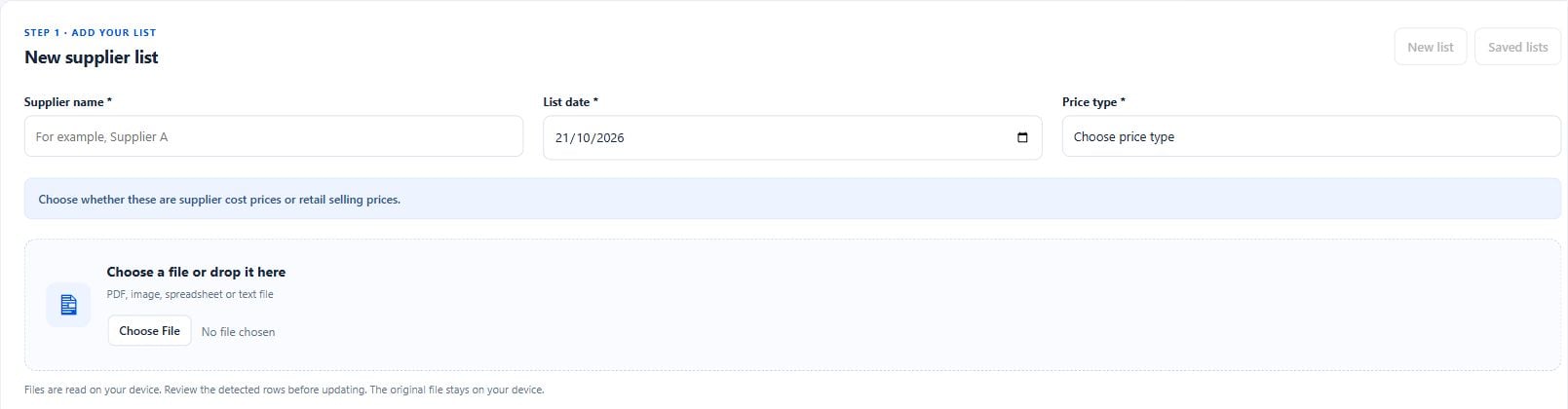
Work with supported uploaded or pasted supplier price lists and supplier/date context.
Analytics & Automation
Import or paste supplier lists, review proposed product matches and deliberately update WooCommerce prices and availability. Keep the preview, approval and change-history stages visible to the operator.
Supplier names and configurations do not always match a store’s catalogue. Applying an unchecked list can update the wrong item or introduce an unintended stock or discount change.
Work with supported uploaded or pasted supplier price lists and supplier/date context.
Review product identification and resolve ambiguous matches before applying changes.
Configure applicable markup and stock handling within a deliberately selected catalogue scope.
Review current/proposed values and retain change history, undo and interrupted-update recovery tools.
Declared minimums describe the reviewed code, not a promise of compatibility with an untested website.
Supplier prices and lists remain private. The marketing page contains no supplier records, cost prices or implied universal markup defaults.
Test actual supplier file formats, product identifiers, tax basis, discount treatment and inventory ownership in staging. Do not apply a broad list until its scope and rules are agreed.
Agree the intended workflow, test representative inputs in a suitable environment and verify the published result. Keep an explicit record of the settings and systems that own the underlying data.
Public downloads are not enabled. Request a demonstration or access discussion so we can review your website, requirements and deployment readiness.
We review the declared requirements and test the relevant theme, integrations and workflows for your environment. A working implementation on another website is not a compatibility guarantee.
Licensing, installation scope, maintenance and support are confirmed before an engagement. No public subscription, price or license entitlement is advertised here.
Test actual supplier file formats, product identifiers, tax basis, discount treatment and inventory ownership in staging. Do not apply a broad list until its scope and rules are agreed.
Clear product configuration choices
WordPress + WooCommerce
Available by consultationExplore product ↗Catalogue-aware content with a review step
WordPress + WooCommerce
Available by consultationExplore product ↗Share your website, current systems and the workflow you want to improve. We will discuss an appropriate scope before proposing access or installation.
Request a Demo