


Configuration pickers
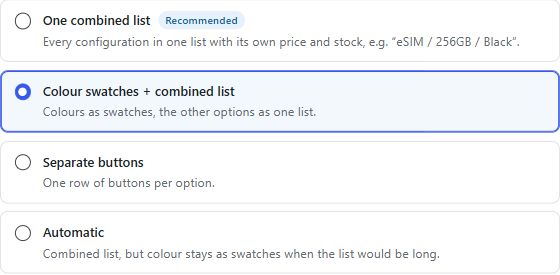
Use combined configuration lists, swatches or separate choices according to the product settings.
WooCommerce
Help customers choose a valid product configuration with a combined picker, supported swatches and linked product-family navigation. Prices, stock and cart eligibility remain grounded in WooCommerce records.
Storage, memory, size and colour choices can become difficult to understand when they are spread across separate pages and controls. This plugin coordinates valid combinations and related family members.
Use combined configuration lists, swatches or separate choices according to the product settings.
Update supported variation information and images using prepared combinations, with ordinary navigation fallbacks.
Connect existing simple or variable products into reviewed families without an automatic catalogue conversion.
Review native combinations and bounded price jobs with explicit apply actions and receipts.
Declared minimums describe the reviewed code, not a promise of compatibility with an untested website.
Custom cart item metadata and theme behavior require testing. The public showcase is not a guarantee of compatibility with every variation extension.
Review theme and cart integration, native variation data and schema ownership. Nested family URLs, family creation and shared prices are separate intentional configuration decisions.
Agree the intended workflow, test representative inputs in a suitable environment and verify the published result. Keep an explicit record of the settings and systems that own the underlying data.
Public downloads are not enabled. Request a demonstration or access discussion so we can review your website, requirements and deployment readiness.
We review the declared requirements and test the relevant theme, integrations and workflows for your environment. A working implementation on another website is not a compatibility guarantee.
Licensing, installation scope, maintenance and support are confirmed before an engagement. No public subscription, price or license entitlement is advertised here.
Review theme and cart integration, native variation data and schema ownership. Nested family URLs, family creation and shared prices are separate intentional configuration decisions.
Delivery management for Kenyan WooCommerce stores
WordPress + WooCommerce
Available by consultationExplore product ↗Structured product information and comparisons
WordPress + WooCommerce
Available by consultationExplore product ↗Share your website, current systems and the workflow you want to improve. We will discuss an appropriate scope before proposing access or installation.
Request a Demo